Sunday, January 17, 2016
How to Make Whiteboard or Dry Erase Tables for Your Classroom
Supplies
* Painter’s Tape (approx $6.50)
* Paint Pan - not pictured (approx $4.00)
* 9" Paint Roller (approx $4.00)
* 1or 2 Foam Paint Roller Covers - no nap (fuzzy) (approx $3.00 each)
* Kilz Primer - optional (water based primer - approx $21.00)
* Rust-Oleum Dry Erase Paint (approx $20.00) I believe it says that it covers 49 sq ft of space.
1. Wash tables thoroughly. Remove all dirt and debris. Dry tables.
2. Optional - Tape edges of the table. If you do make sure you push down hard on the tape so the paint doesn't bleed onto the sides under the tape. I did three tables, two I taped and one I did not. I think I liked the un-taped table better.
3. Paint the tables with the primer. This is optional because the dry erase paint will dry clear. You can leave the tables brown or whatever color it is, if you would like. I painted the tables with primer because I thought it gave the classroom a cleaner, brighter look. I used two coats even on a white faux marble table. Use the foam roller. Make sure you follow the directions on the paint can for drying. It is important that each coat of paint dries thoroughly.
4. Clean paint tray with warm water if you painted with the primer.
5. When you open the box of paint, you will find two cans inside. Mix part A (activator) and part B (base) separately, then pour A into B, mix it well. Poured the paint into the paint tray and begin rolling it on the tables. It will look textured, but once it dries it is smooth. You will need at least two coats of this paint as well. The video says 10 - 15 minutes of drying time between coats, but the back of the box says 20 - 30 minutes. I think longer is better. Humidity in the air may be a factor in drying time. The directions on the box of Rust-Oleum Dry Erase Paint also states that an open can should be used within an hour, or it will no longer work correctly, so keep an eye on the clock.
The paint takes three days to cure until you can write on the table. Do not use pink or neon markers to write on the table. For whatever reason that pigment can't be removed. We also decided not to use red markers either. A soft cloth or white board dry erase liquid cleaner can be used to clean the table. I was able to paint 2 - 5 ft tables and 2 round tables (like the one pictured above)
If you follow the directions you should get some, much needed, additional work space for your kiddos.
Sunday, January 10, 2016
Flexible Learning Environments - The Starbucks Classroom and more
Our district has achieved Apple Distinguish Program status (2012 - 2017). One of the categories for Apple Distinguish Program is flexible learning environments. As our one-to-one program has changed and grown, so have our flexible learning spaces. We knew that when we went 1:1 we would have to change our learning spaces (and lots of other things too). We got rid of desks and brought in tables. Many teachers got rid of their teacher’s desks too. Some even brought in alternative chairs like exercise balls, or stools. Many teachers also began to send students to hallways and landings for recording. These recordings were for students to demonstrate their thinking and understanding of the concepts that were being taught. Each school bought at least one green screen kit. Teachers also began buying them on their own or making them out of the materials that they had available. They're actually quite easy to make on your own. I've seen green screens made for as little as $10.
We’ve even used Double Robot (as seen on Modern Family and Big Bang Theory) to help home bound students. The home bound student is able to drive the robot around their classroom. They are able to participate in small group, whole group and individual activities as if they were there. Our Superintendent Dr. Stan Fields has been talking about having our libraries look more like Starbucks for about three years now. He has been an advocate for alternate learning spaces. It's great when you have supportive administrators. We have admins who understand, you can't just keep doing the same things, and expect to get different results.
In November I observed +Virginia Burdett's classroom. As I observed in her room I realized that she is doing amazing things in her instruction, but that her students were hardly ever in their seats, at their tables, or even in the classroom. Which is not necessarily a bad thing. With the way that Ginny teaches and the way her students learn they don't need to be in their seats all the time. They needed an even more flexible learning space.
I met with Ginny and she agreed. We began planning and negotiating what the room might look like. We started with a Google Doc. We made different categories, like what to keep, what to get rid of, what to buy, what to make, and what to get donated. We scoured the web for pictures of flexible learning spaces, and made notes about what we liked, and didn't like about the spaces. We kicked that around for about two weeks. We thought it was important to keep some traditional seating in the classroom. We also agreed there should be some alternative seating. The biggest thing we agreed on was that 4-BU had way too much furniture for the number of students and square footage of the room. She had to 2 - 6 foot tables and 4 - 5 foot tables for 23 students (see pics above). One of the things that we had to make sure we remembered was that in the end there would be enough seating or a space for every child in the room, plus a few extra. We got some of our inspiration from this article by Kayla Delzer, Why the 21st Century Classroom May Remind You of Starbucks. Thanks Kayla for including pics and FAQs!
Over winter break we worked to empty out the classroom and get it organized. There were 24 student chairs in the room we got rid of 16 and kept eight. The eight chairs are now at the two traditional tables. There are four chairs at each table. We kept three of the 5 foot tables. We got rid of both of the 6 foot tables and one of the 5 foot tables. Eventually we hope to get rid of one more 5 foot table and add more alternative seating. We also brought in 1 circle table. We got rid of the teacher’s desk. Ginny was only using the teacher's desk for some storage and a place to put her teacher laptop while using the Apple TV, so she knew she wouldn’t miss it. In the front of the room where the teacher's desk was we replaced that with the circle table. I painted the circle table and two of the 5 foot tables with whiteboard paint. It is a very inexpensive alternative to purchasing regular white board tables. It cost about $50 to paint the three tables. I got the idea from this blog post and read more about the process on the Rustoleum website.
Our fabulous custodian took part of the legs off of two of the 5 foot tables, so that they are about 18 inches off the ground. Ginny bought 10 pillows from Target. They were $10 each. She brought in an old futon and a small side table that she had at home. I found a floor lamp for free on a swap site on Facebook. She had two bungee chairs in her room already, and some small circle size carpets. She also had a black cube, that is an ottoman and also opens up for storage. We got rid of the students' seat pockets that were on the backs of the chairs. Ginny bought 3 -10 drawer carts from Sam's Club for students to store their belongings. They have a few folders, their iPads, a pencil case and headphones. We are still in need of curtains, three large carpets (for under the tables), clipboards, and a new seating arrangement that I don't want to say too much about. We want it to be a surprise. The curtains are being made and we will write a Donor's Choose proposal for the rest.
In the end I would say that we have three different types of seating. We have two traditional tables one circle, and one rectangle. They hold four children each or 8 children total. The circle table is a whiteboard table. We have two semi-traditional seating spaces. These are the 5 foot rectangle white board tables which are 18 inches from the floor. The students sit on pillows at these tables. There are five pillows at each table, for a total of 10 students. At this time we have two non-traditional seating arrangements. One of these spaces is the futon. The maximum capacity at the futon is three students. We also have the bungee chairs and cube. Up to three students may sit in this area, for a total of six more spots. This makes a total of 24 spots. We made signs for each seating area. The signs named the area and gave the maximum seating capacity. They will stay at the tables, as a reminder, till they get lost or torn up.
This is a very good group of students and they have been very respectful and responsible about their choices of where to sit. Ginny has done a good job of teaching them respect and responsibility this year. The thoughtful way in which she rolled out the new seating also helped.
On the first day of open seating I had one boy who was sitting on the futon all by himself. He put the futon down into a bed. After a transition two girls joined him on the futon while it was still in the bed position. All three lay there and read their books. As I walked over he began to stand up, he told me that he now wanted it back in the couch position, but the girls did not want to have it that way. I politely told him that he had two choices he could continue using the futon in the bed position, or he could choose somewhere else to sit. I talked to another student for a minute or two and when I looked around I saw that he had chosen a new place to sit. This all happened without incident. If you give the students choice and responsibility they will rise to the occasion. They appreciate you treating them like adults.
When the administrators in the building came to see what we had done and how the students had reacted, they both said to me that they would love it if other teachers would do the same. I said to them that this does not fit every teacher's style.
This was a fun experience. It is still a work in progress. We have blasted out on Twitter pictures of what we have done. Watch for more on Twitter from @rmbtowner_tech and @MissBurdettHIA as we continue to add things and make changes.
I had another teacher in our district approach me already. She would like me to help her with her room redesign next school year. Her big request is a space for green screen recording. That is going to be a challenge that I can't wait take on.
Thank you to Ginny for giving me an opportunity to do a project that expanded my horizons and pushed my limits. I have to give Ginny a lot of props for changing her room and her routine during the middle of the school year. This is not easy for any teacher, but Ginny embraced it and made it hers. She certainly has courage and determination! She did it because she knew it was what is best for her students!
One additional note, there were no 4-BU students working in the hall or in the Principal's office this week. Problem solved!
Stay tuned. I will write about the finishing touches for this project and give final out of pocket cost.
Thanks to Dr. Fields, Director Jordan Garrett, Principal Karen Marino, Assistant Principal Jodi Meyer, Kayla Delzer, Jennifer Williams, Fran Siracusa and Andi McNair for the inspiration and support. #bsd100, #LaunchMe15, #EdCampTB
We’ve even used Double Robot (as seen on Modern Family and Big Bang Theory) to help home bound students. The home bound student is able to drive the robot around their classroom. They are able to participate in small group, whole group and individual activities as if they were there. Our Superintendent Dr. Stan Fields has been talking about having our libraries look more like Starbucks for about three years now. He has been an advocate for alternate learning spaces. It's great when you have supportive administrators. We have admins who understand, you can't just keep doing the same things, and expect to get different results.
| Before -South Side of the Room |
| Before - West Side of the Room |
| Before - North Side of the Room |
| Before - Southeast Corner of the Room |
In November I observed +Virginia Burdett's classroom. As I observed in her room I realized that she is doing amazing things in her instruction, but that her students were hardly ever in their seats, at their tables, or even in the classroom. Which is not necessarily a bad thing. With the way that Ginny teaches and the way her students learn they don't need to be in their seats all the time. They needed an even more flexible learning space.
| Students reading in the Principal's Office |
![]() |
| All the furniture we removed |
| Supplies for Creating Whiteboard Tables |
Our fabulous custodian took part of the legs off of two of the 5 foot tables, so that they are about 18 inches off the ground. Ginny bought 10 pillows from Target. They were $10 each. She brought in an old futon and a small side table that she had at home. I found a floor lamp for free on a swap site on Facebook. She had two bungee chairs in her room already, and some small circle size carpets. She also had a black cube, that is an ottoman and also opens up for storage. We got rid of the students' seat pockets that were on the backs of the chairs. Ginny bought 3 -10 drawer carts from Sam's Club for students to store their belongings. They have a few folders, their iPads, a pencil case and headphones. We are still in need of curtains, three large carpets (for under the tables), clipboards, and a new seating arrangement that I don't want to say too much about. We want it to be a surprise. The curtains are being made and we will write a Donor's Choose proposal for the rest.
| After - Southeast Corner of the Room |
| After - Looking South Across the Room |
| After - West Side of the Room |
![]() |
| Floorplanner.com 2D & 3D image for planning. |
In the end I would say that we have three different types of seating. We have two traditional tables one circle, and one rectangle. They hold four children each or 8 children total. The circle table is a whiteboard table. We have two semi-traditional seating spaces. These are the 5 foot rectangle white board tables which are 18 inches from the floor. The students sit on pillows at these tables. There are five pillows at each table, for a total of 10 students. At this time we have two non-traditional seating arrangements. One of these spaces is the futon. The maximum capacity at the futon is three students. We also have the bungee chairs and cube. Up to three students may sit in this area, for a total of six more spots. This makes a total of 24 spots. We made signs for each seating area. The signs named the area and gave the maximum seating capacity. They will stay at the tables, as a reminder, till they get lost or torn up.
Collaborative Learning Spaces: Classrooms That Connect to the World written by my friends Jennifer Williams and Fran Siracusa suggests that students should be involved in the process. We didn't do this. Instead we chose to surprise Ginny’s students when they returned from winter break. Boy were they surprised! Ginny used this chart to work with them and introduce the new learning space. She did a fabulous job of setting the tone. Students spent the next three days rotating through the three different learning spaces (thanks Kayla). They had to stay in the same seat the entire day. Each day they were asked to reflect about their experience in a Schoology discussion. At the end of the three day trial students were allowed to sit anywhere.
This is a very good group of students and they have been very respectful and responsible about their choices of where to sit. Ginny has done a good job of teaching them respect and responsibility this year. The thoughtful way in which she rolled out the new seating also helped.
When the administrators in the building came to see what we had done and how the students had reacted, they both said to me that they would love it if other teachers would do the same. I said to them that this does not fit every teacher's style.
This was a fun experience. It is still a work in progress. We have blasted out on Twitter pictures of what we have done. Watch for more on Twitter from @rmbtowner_tech and @MissBurdettHIA as we continue to add things and make changes.
I had another teacher in our district approach me already. She would like me to help her with her room redesign next school year. Her big request is a space for green screen recording. That is going to be a challenge that I can't wait take on.
Thank you to Ginny for giving me an opportunity to do a project that expanded my horizons and pushed my limits. I have to give Ginny a lot of props for changing her room and her routine during the middle of the school year. This is not easy for any teacher, but Ginny embraced it and made it hers. She certainly has courage and determination! She did it because she knew it was what is best for her students!
One additional note, there were no 4-BU students working in the hall or in the Principal's office this week. Problem solved!
Stay tuned. I will write about the finishing touches for this project and give final out of pocket cost.
Thanks to Dr. Fields, Director Jordan Garrett, Principal Karen Marino, Assistant Principal Jodi Meyer, Kayla Delzer, Jennifer Williams, Fran Siracusa and Andi McNair for the inspiration and support. #bsd100, #LaunchMe15, #EdCampTB
Thursday, December 31, 2015
Tales of the iCoach 2015
At this time of the year you can either do a year in review, or goals for the next year. I am going to do the year in review. I especially like blogging as a reflective tool. I feel it is important to know where you have been in order to know where you are going. One of my major goals for 2015 was to present outside my district. While I don't have a fear of speaking in front of big crowds, presenting outside the district really pushed me outside my comfort zone. I had to be organized and succinct, two things that I always aspire to do better. I was able to present 6 times to a broader audience! The summer was especially great. I did a Birds of a Feather session at ISTE entitled Tech Coach Therapy.
One of the best things about my job is that I get to go to many different classrooms around our district. I enjoy watching staff and students grow! Growth and change can be messy or difficult at times. That is why I enjoy being there to support the staff in my district.
After I look back at 2015 I can set my goals for 2016! Here are some pictures and commentary.
I worked in the primary grades the majority of the time last school year. For many of the teachers that I work with integrating QR codes into center time or workshop time just makes sense. It is a good place to start integrating tech. The teachers usually start with free lessons from Teachers Pay Teachers. Then I work with them to create their own. The kids really like doing QR codes too. QR codes can be done on mobile devices or computers.
I took +Jordan Garrett's place presenting Integrating Tech Into the Reading Writing Workshop at the Waukegan Google 'n More Conference. Jordan and I presented Bringing PLCs to Life with Google + at ICE our state conference. It was great to have the entire team there to support us! We continued to refine our presenting skills.
My FAVORITE projects of the year were the animal Touchcasts that I did with 1st graders. I wrote all about the process here.
In April I finally got to work with middle school students. We made non-fiction magazines for 4th and 5th graders. The great thing about this project was giving the 7th graders an authentic audience. They changed their approach to the project based on their new sense of audience. It was really amazing to see. The final product and the platform that we used to share out the projects can be seen here.
October and November seemed to blend together. The school year was in full swing, I was presenting PD during contract time, after school PD and traveling. In the beginning of October I went down to Tampa Bay/Clearwater Florida for Launch Me with Brad Waid and Ed Camp Tampa Bay. Both amazing experiences! At Launch Me I was surrounded by like minded educators who are risk takers, always pushing the boundaries. Everyone in that room wants to change the world for the better. Brad talked about his path, his challenges and gave us pointers on how to make ourselves better. It was a real eye opener for me about what it really takes to be a national or international keynote speaker. Once you commit you can't be wishy-washy. You are either in 100% or it won't work.
I thoroughly enjoyed my Ed Camp experience. It was a very relaxed atmosphere with great conversations. All of the people that I met over those 4 days were so great! Thanks to the Ed Camp crew for letting me help with set up. I came in and asked if I could help in any way and they put me to work. I was happy to see how the set up works, esp since we have been transitioning to a true Ed Camp model for our in district institute days. Oh and if you look closely at the 1st pic above you will see a Tesla symbol. The lovely and talented Fran Siracusa let me drive her Tesla, icing on the cake!!! Thanks Fran!
I would like to give a shout out to the wonderful educators who I met in Florida. They continue to influence and support me! Wonderful educators and human beings!
Nikolas Chatzopoulos @chatzopoulosn
Sean Gaillard @smgaillard
Katrina Keene @Teachintechgal
Natalie Krayenvenger @NKrayenvenger
Andi McNair @mcnairan3
Bryan Miller @Edtechnerd
Fran Siracusa @la_Profe_S
Susan Wells @wellssusan
Kara Welty @Kara_Welty
Jen Williams @JenWilliamsEdu
Please follow them on Twitter if you are not already!
As a district we are working on a project to embed SAMR as a common reflective instructional language into our school culture. I need to write a proper blog post about the entire process soon. In sort my team and I spent 6 weeks in October and November talking to staff about SAMR and its use in planning instruction. I'm working on a video that we used during our PD. I need to finalize it and include the link in my blog post.
I also coached a 2nd grade teacher to integrate more technology into her instruction. I really enjoyed teaching the kids to use the new features of myOn. They were able to annotate text right inside the web version of the app.
During December I started working with +Virginia Burdett . As I observed in her room I realized that she is doing amazing things in her instruction, but that her students were hardly ever in their seats, at their tables, or in the classroom. Which is not necessarily a bad thing. With the way that Ginny teaches and the way her students learn they don't need to be in their seats. They need an even more flexible learning space. Ginny and I worked over winter break to make the room look like the blue print pictured above. We have run into a few budget issues. It has slowed us down a bit, but has not stopped us. When the process is all done I will definitely blog about it. It has been an uplifting experience! We both can't wait till it is done.
One last thing about December - Mike Saracini and I were named Touchcast Ambassadors for 2016. I look forward to spreading the awesomeness that is Touchcast!
Wow! When presented like this I realize that I have accomplished so many things in 2015! Kara Welty asked on Instagram today what is one thing that you were proud of in 2015. I don't think I can choose just one! That's where I've been over the last year. Here's to more great things in 2016!
One of the best things about my job is that I get to go to many different classrooms around our district. I enjoy watching staff and students grow! Growth and change can be messy or difficult at times. That is why I enjoy being there to support the staff in my district.
After I look back at 2015 I can set my goals for 2016! Here are some pictures and commentary.
I worked in the primary grades the majority of the time last school year. For many of the teachers that I work with integrating QR codes into center time or workshop time just makes sense. It is a good place to start integrating tech. The teachers usually start with free lessons from Teachers Pay Teachers. Then I work with them to create their own. The kids really like doing QR codes too. QR codes can be done on mobile devices or computers.
My FAVORITE projects of the year were the animal Touchcasts that I did with 1st graders. I wrote all about the process here.
In April I finally got to work with middle school students. We made non-fiction magazines for 4th and 5th graders. The great thing about this project was giving the 7th graders an authentic audience. They changed their approach to the project based on their new sense of audience. It was really amazing to see. The final product and the platform that we used to share out the projects can be seen here.
May was great! +Michael Saracini and I took 2 of his students down to our state capitol building in Springfield to show our legislators how tech in education supports learning. Mike's kids did interviews and made Touchcasts on the fly!
Berwyn South School District hosted its 1st Ed Tech Conference, iEngage-Berwyn. On Friday, May 8th we had site visit tours, so that our guest could see 1:1 in action in the classrooms. At night we had a social gathering with a Color Alive demo by +Brad Waid (@TechBradWaid) and music by Big Data, a band comprised of tech directors from across Illinois. On Saturday we had breakout sessions of a traditional conference mostly presented by our own staff. Jordan and I did Bringing PLCs to Life with Google + again. I wrote about the conference and so did +Carl Hooker. Carl says it is An Inspiring Event Every Educator Should Experience.
In June I did a Birds of a Feather session at ISTE (read my blog post). This was a huge honor and I was so glad to be selected to have a session. I also was able to make some extra money working for a fabulous company, Ed Tech Teacher. I worked with the amazing +Beth Holland and +Shawn McCusker. I was the assistant in the room for Chromebooks in the Classroom and iPads and Google respectively. Watching Beth and Shawn gave me so many pointers on how to present PD. I was honored to be a part of their sessions!
In July Jordan and I presented 4 times over 2 days at iPadpalooza Indiana in Noblesville. We were able to perfect our skills. We were again surrounded by some amazing educators. Thanks to Carl Hooker for the great conversation and the awesome advice!
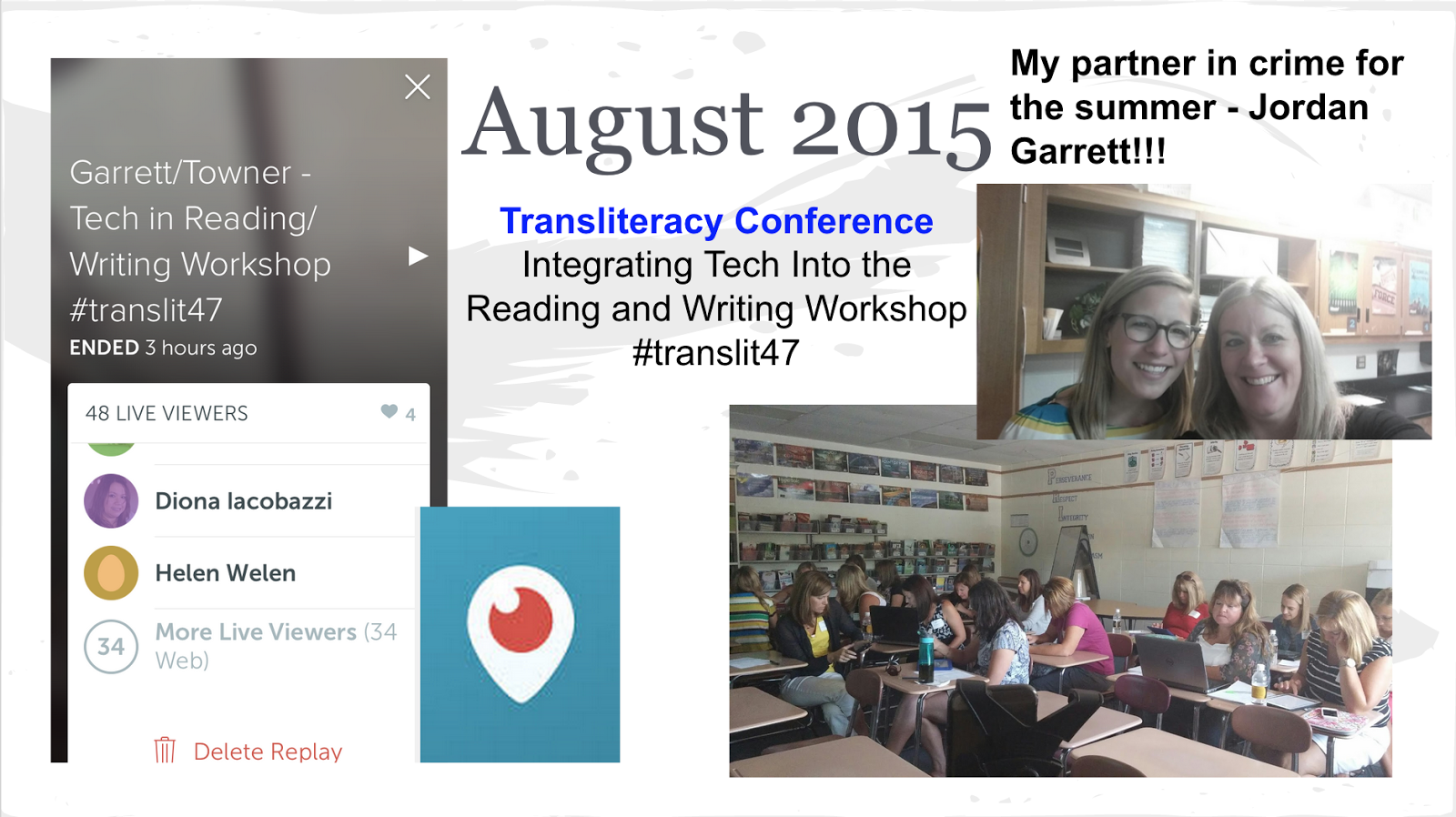
In August we presented at the Transliteracy Conference in Crystal Lake, Illinois. Jordan and I used Periscope to broadcast our presentation this time. I enjoyed attending a small local conference similar to iEngage, again surrounded by amazing educators! Thanks to +Corey Holmer for inviting us.
I enjoyed traveling and sharing Berwyn South's story this summer!
Always exciting to start another school year, my 26th in the business! I helped 8th graders set up their blogs on Blogger for iPads and use Touchcast to create newscasts. My big push this school year is to help teachers find apps that let them and their students show their thinking and demonstrate their understanding! Touchcast is a perfect app for that purpose. I am also the Google Apps Admin for our district. The Tech Director, +James Kloss and I worked to create 4,000 student Google Apps accounts.
I thoroughly enjoyed my Ed Camp experience. It was a very relaxed atmosphere with great conversations. All of the people that I met over those 4 days were so great! Thanks to the Ed Camp crew for letting me help with set up. I came in and asked if I could help in any way and they put me to work. I was happy to see how the set up works, esp since we have been transitioning to a true Ed Camp model for our in district institute days. Oh and if you look closely at the 1st pic above you will see a Tesla symbol. The lovely and talented Fran Siracusa let me drive her Tesla, icing on the cake!!! Thanks Fran!
I would like to give a shout out to the wonderful educators who I met in Florida. They continue to influence and support me! Wonderful educators and human beings!
Nikolas Chatzopoulos @chatzopoulosn
Sean Gaillard @smgaillard
Katrina Keene @Teachintechgal
Natalie Krayenvenger @NKrayenvenger
Andi McNair @mcnairan3
Bryan Miller @Edtechnerd
Fran Siracusa @la_Profe_S
Susan Wells @wellssusan
Kara Welty @Kara_Welty
Jen Williams @JenWilliamsEdu
Please follow them on Twitter if you are not already!
As a district we are working on a project to embed SAMR as a common reflective instructional language into our school culture. I need to write a proper blog post about the entire process soon. In sort my team and I spent 6 weeks in October and November talking to staff about SAMR and its use in planning instruction. I'm working on a video that we used during our PD. I need to finalize it and include the link in my blog post.
I also coached a 2nd grade teacher to integrate more technology into her instruction. I really enjoyed teaching the kids to use the new features of myOn. They were able to annotate text right inside the web version of the app.
During December I started working with +Virginia Burdett . As I observed in her room I realized that she is doing amazing things in her instruction, but that her students were hardly ever in their seats, at their tables, or in the classroom. Which is not necessarily a bad thing. With the way that Ginny teaches and the way her students learn they don't need to be in their seats. They need an even more flexible learning space. Ginny and I worked over winter break to make the room look like the blue print pictured above. We have run into a few budget issues. It has slowed us down a bit, but has not stopped us. When the process is all done I will definitely blog about it. It has been an uplifting experience! We both can't wait till it is done.
Wow! When presented like this I realize that I have accomplished so many things in 2015! Kara Welty asked on Instagram today what is one thing that you were proud of in 2015. I don't think I can choose just one! That's where I've been over the last year. Here's to more great things in 2016!
Sunday, December 6, 2015
Delivering Quality Professional Development in a 1:1 School District
Delivering good professional development these days has become a challenge. I have seen posts on Instagram and Twitter that say something to the effect of - Students don't need professional development when they get a new device or buy a new app. Meaning they don't so why do teachers? Kids don't call it professional development, but they afford themselves time to learn the app on their own. They keep "driving" the app till they have it figured out. They go to You Tube, a blog, or a site when they are stuck because they know someone else has already figured it out if they can't. The number one complaint I get from the staff is,"I don't have enough time to get everything done." My reply to that is usually, "Sleep is over rated" while it's meant to lighten the mood, I know that many teachers have trouble finding the time to learn one more new thing.
So the question becomes, how do we provide quality professional development for teachers? It is a process. As your district grows and changes in the 1:1 environment, so will your professional development (PD) sessions. As part of the Instructional Coach team I am also a member of the professional development team in our district. I have helped provide after school and summer PD for the last four years. Our PD has evolved just as our teaching and learning has evolved since we went 1:1.
Solid professional development is paramount in a 1:1 district. Our PD on institute days used to be sit and get. Those days were targeted to classroom teachers. If you weren't a classroom teacher it was very painful. Then we started doing breakout sessions similar to a conference. Staff members could pick sessions that were relevant to their skill level, or what they were teaching. We had very few outside speakers. Teacher leaders were paid to prep and present. All types of teachers stepped up to provide PD to their peers. Now we have moved to a true ed camp model. We are all experts at something and we can all learn from each other. We will still have to have some whole group sessions at our institute days since there are some things that are not negotiable like disaster drill prep, summative assessment in-service, and other whole district initiatives.
I really wanted to talk about how I do my after school sessions now (sometimes I do them at outside conferences and institute days too). The sessions are 90 minutes long. Teachers get continuing education units for attending. When I am prepping I keep in mind the fact that teachers say the biggest thing they lack is time. I make my presentation a resource that they can refer back to at a later date. The following slides are examples from a session called - Integrating Technology into the Reading and Writing Workshop. These slides deal with using Evernote to conference with students. In this instance the app is used for teacher productivity. First, I discuss how the app will improve teaching and learning. If there are members of the audience who have used it I ask them to share their story as well. Again, we can always learn from each other. They may have some insight that I had never considered. This one way to bring in and engage your audience right from the start. I think it is very important to do that at any PD session.
I also give the attendees a challenge. This gives them a chance to have "sandbox" time with the app. This is what I was talking about previously that students do. They always afford themselves some "sandbox" time to see what the app can do. I find that the challenges give the teachers a structure to work with instead of saying, "Just try the app". It is exploration with a purpose. The logo of the app in this slide is linked to the official You Tube channel for Evernote. If there is not an official channel then I will search for a quality video for the app. This way teachers can refer back to this tutorial later. Under the logo is the link to the apps Twitter handle (if they have one). I have been able to tweet at app designers, and get answers to my questions in minutes or hours. Generally app designers are eager to hear from their users, especially teachers.
I do my presentation one of two ways depending on the topic, audience, and amount of time that I have for the presentation. The first is to introduce the first app and then give the challenge, introduce the second app and do the challenge and so on. The other way that I do it is to introduce all the apps and then allow for one large chunk of work time at the end. I allow for work time in all the training sessions that I present. It is better for teachers to work while all the information is fresh in their minds. I then act as facilitator, and walk around the room answering questions while they are working on the challenges.
I do all my presentation slides in Google Slides, publish them, and then make a bitly link that I share with all attendees. This way attendees can go back to the presentation at a later date to get the information they need.
I have gotten good feedback using this method in my PD sessions. How do you do PD? I would love to hear how you give or get PD that meets your needs.
So the question becomes, how do we provide quality professional development for teachers? It is a process. As your district grows and changes in the 1:1 environment, so will your professional development (PD) sessions. As part of the Instructional Coach team I am also a member of the professional development team in our district. I have helped provide after school and summer PD for the last four years. Our PD has evolved just as our teaching and learning has evolved since we went 1:1.
Solid professional development is paramount in a 1:1 district. Our PD on institute days used to be sit and get. Those days were targeted to classroom teachers. If you weren't a classroom teacher it was very painful. Then we started doing breakout sessions similar to a conference. Staff members could pick sessions that were relevant to their skill level, or what they were teaching. We had very few outside speakers. Teacher leaders were paid to prep and present. All types of teachers stepped up to provide PD to their peers. Now we have moved to a true ed camp model. We are all experts at something and we can all learn from each other. We will still have to have some whole group sessions at our institute days since there are some things that are not negotiable like disaster drill prep, summative assessment in-service, and other whole district initiatives.
I really wanted to talk about how I do my after school sessions now (sometimes I do them at outside conferences and institute days too). The sessions are 90 minutes long. Teachers get continuing education units for attending. When I am prepping I keep in mind the fact that teachers say the biggest thing they lack is time. I make my presentation a resource that they can refer back to at a later date. The following slides are examples from a session called - Integrating Technology into the Reading and Writing Workshop. These slides deal with using Evernote to conference with students. In this instance the app is used for teacher productivity. First, I discuss how the app will improve teaching and learning. If there are members of the audience who have used it I ask them to share their story as well. Again, we can always learn from each other. They may have some insight that I had never considered. This one way to bring in and engage your audience right from the start. I think it is very important to do that at any PD session.
Next we look at features of the app or what makes the app unique. In this instance I explain the difference between a note and a notebook, attachments, sharing, syncing across devices, etc. Also at the bottom of this slide you see the word augmentation. I try to tie in the SAMR ladder for all my presentations. In this example the app is a direct tool substitute with functional improvement. I don't like those wheels that show different apps for different levels of the SAMR ladder. It is not the app that determines the level. It is the objective of the lesson, and what skill(s) you are assessing that determine where the app is on the ladder.
I also give the attendees a challenge. This gives them a chance to have "sandbox" time with the app. This is what I was talking about previously that students do. They always afford themselves some "sandbox" time to see what the app can do. I find that the challenges give the teachers a structure to work with instead of saying, "Just try the app". It is exploration with a purpose. The logo of the app in this slide is linked to the official You Tube channel for Evernote. If there is not an official channel then I will search for a quality video for the app. This way teachers can refer back to this tutorial later. Under the logo is the link to the apps Twitter handle (if they have one). I have been able to tweet at app designers, and get answers to my questions in minutes or hours. Generally app designers are eager to hear from their users, especially teachers.
I do my presentation one of two ways depending on the topic, audience, and amount of time that I have for the presentation. The first is to introduce the first app and then give the challenge, introduce the second app and do the challenge and so on. The other way that I do it is to introduce all the apps and then allow for one large chunk of work time at the end. I allow for work time in all the training sessions that I present. It is better for teachers to work while all the information is fresh in their minds. I then act as facilitator, and walk around the room answering questions while they are working on the challenges.
I do all my presentation slides in Google Slides, publish them, and then make a bitly link that I share with all attendees. This way attendees can go back to the presentation at a later date to get the information they need.
I have gotten good feedback using this method in my PD sessions. How do you do PD? I would love to hear how you give or get PD that meets your needs.
Sunday, September 27, 2015
Where Are You In Your Tech Journey?
I started this post approximately 11 months ago and let it sit. I think that the beginning still holds true, so I decided not to delete it.
Written November 2014
My first reflection on +EdTechTeacher iPad Summit in Boston was about being a presenter. This post is about being a conference attendee. There is a huge difference and I did not want to bore anyone with a really long post about both at once. It is always good to go to a conference. It is rare that I don't leave feeling re-energized, and I always come away with new ideas. I was definitely re-energized from attending this conference, but I did not get as many good ideas as I thought I would. The keynotes were outstanding and really made me think. Over the two days I only attended one breakout session that resonated with me. It was entitled, Student Lead Conferences: Using the iPad to Create Portfolio Driven Discussions with the Families. Of course there were many good sessions with good titles and good descriptions, but I couldn't be two places at once and sometimes the title and description don't always tell me everything I need to know about a session. At many of the conferences I go to these days, I here this phrase, "Go where you grow." Meaning that I should get up and walk out a of session if it is not meeting my needs. Typically, I don't do that. When I am in a session that I'm not getting a lot out of I usually think to myself, "It will get better." or "You will get something out of it." I'm just not comfortable leaving a session in the middle. Although it does not bother me when people walk out of my sessions. Why is that of the eight sessions that I attended over the two days, did I only find one beneficial? It really bothered me for two reasons. First, my district spent a lot of money to send me to a conference in another state, I had to bring something back to share. Secondly, I'm not a know it all. There is always room for improvement. I went up to Laura Botte, one of the presenters, when they were done and told her how great the presentation was. She seemed surprised and said, "Thank You". At that moment it dawned on me why I liked their presentation so much. The reasons are two fold. We are discussing rolling out some type of portfolio system in my district and this seems do-able. The second is because of where I am at in my 1:1 journey. The portfolio session is what I need for where I am in my journey now. I was ready to hear that message at that time. Be ready. You never know when you are going to hear a message that you need. Sometimes they come when you are not expecting them.
Written September 2015
I help plan and provide professional development for my district, Just like the way we deliver content for our students, our content for professional development must meet teachers where they are. That is what makes planning and delivering meaningful whole group professional development so difficult. If I have 20 staff members in the room I have to meet them in at least 10 or more different places. When I plan professional development now I spend very little time talking at my staff. I include articles, videos and hands on challenges, so that teachers can work on the things that they need to work on. They can pick and choose from the relevant materials that I have provided. This seems to work well and I have gotten positive feedback on the sessions I have provided. I circulate the room answering questions as they move through the tasks provided. This strategy helps meet them where they are in their journey.
As a coach I also need to meet teachers where they are to help support them as they plan and carry out student instruction. Our Apple Trainer Dan Schmit told us in the fall of 2012, "Honor where you are and make a goal to move to the next level." It is ok to be where ever you are on the SAMR model or in your tech journey, whether you have only done work at substitution or have done projects with your students that have been at the redefinition level. Here's the thing about redefinition. It is a moving target. The definition of redefinition is - Tech allows for the creation of new task previously inconceivable. What was once inconceivable is now being done. At one time QR codes redesigned the task of inventorying car parts in a warehouse in Japan. Now in education I generally consider them augmentation on the SAMR ladder. (Remember you have to look at task design along with the lesson objective.) When I realized that redefinition was a moving target it was a big ah-ha moment. I knew then that I need to use the SAMR model as a reflective tool to keep me moving forward when evaluating my tech skills and working with teachers to improve theirs. One of the other things that I have learned in my role as a coach is that most people can't skip a level on the ladder. It truly is a continuum.
Where are you in your tech journey? What resonates with you? I'd love to hear from you in the comments section.
Written November 2014
My first reflection on +EdTechTeacher iPad Summit in Boston was about being a presenter. This post is about being a conference attendee. There is a huge difference and I did not want to bore anyone with a really long post about both at once. It is always good to go to a conference. It is rare that I don't leave feeling re-energized, and I always come away with new ideas. I was definitely re-energized from attending this conference, but I did not get as many good ideas as I thought I would. The keynotes were outstanding and really made me think. Over the two days I only attended one breakout session that resonated with me. It was entitled, Student Lead Conferences: Using the iPad to Create Portfolio Driven Discussions with the Families. Of course there were many good sessions with good titles and good descriptions, but I couldn't be two places at once and sometimes the title and description don't always tell me everything I need to know about a session. At many of the conferences I go to these days, I here this phrase, "Go where you grow." Meaning that I should get up and walk out a of session if it is not meeting my needs. Typically, I don't do that. When I am in a session that I'm not getting a lot out of I usually think to myself, "It will get better." or "You will get something out of it." I'm just not comfortable leaving a session in the middle. Although it does not bother me when people walk out of my sessions. Why is that of the eight sessions that I attended over the two days, did I only find one beneficial? It really bothered me for two reasons. First, my district spent a lot of money to send me to a conference in another state, I had to bring something back to share. Secondly, I'm not a know it all. There is always room for improvement. I went up to Laura Botte, one of the presenters, when they were done and told her how great the presentation was. She seemed surprised and said, "Thank You". At that moment it dawned on me why I liked their presentation so much. The reasons are two fold. We are discussing rolling out some type of portfolio system in my district and this seems do-able. The second is because of where I am at in my 1:1 journey. The portfolio session is what I need for where I am in my journey now. I was ready to hear that message at that time. Be ready. You never know when you are going to hear a message that you need. Sometimes they come when you are not expecting them.
Written September 2015
I help plan and provide professional development for my district, Just like the way we deliver content for our students, our content for professional development must meet teachers where they are. That is what makes planning and delivering meaningful whole group professional development so difficult. If I have 20 staff members in the room I have to meet them in at least 10 or more different places. When I plan professional development now I spend very little time talking at my staff. I include articles, videos and hands on challenges, so that teachers can work on the things that they need to work on. They can pick and choose from the relevant materials that I have provided. This seems to work well and I have gotten positive feedback on the sessions I have provided. I circulate the room answering questions as they move through the tasks provided. This strategy helps meet them where they are in their journey.
As a coach I also need to meet teachers where they are to help support them as they plan and carry out student instruction. Our Apple Trainer Dan Schmit told us in the fall of 2012, "Honor where you are and make a goal to move to the next level." It is ok to be where ever you are on the SAMR model or in your tech journey, whether you have only done work at substitution or have done projects with your students that have been at the redefinition level. Here's the thing about redefinition. It is a moving target. The definition of redefinition is - Tech allows for the creation of new task previously inconceivable. What was once inconceivable is now being done. At one time QR codes redesigned the task of inventorying car parts in a warehouse in Japan. Now in education I generally consider them augmentation on the SAMR ladder. (Remember you have to look at task design along with the lesson objective.) When I realized that redefinition was a moving target it was a big ah-ha moment. I knew then that I need to use the SAMR model as a reflective tool to keep me moving forward when evaluating my tech skills and working with teachers to improve theirs. One of the other things that I have learned in my role as a coach is that most people can't skip a level on the ladder. It truly is a continuum.
Where are you in your tech journey? What resonates with you? I'd love to hear from you in the comments section.
Subscribe to:
Posts (Atom)